
doctr.transforms#
Data transformations are part of both training and inference procedure. Drawing inspiration from the design of torchvision, we express transformations as composable modules.
Supported transformations#
Here are all transformations that are available through docTR:
- class Resize(
- size,
- interpolation=F.InterpolationMode.BILINEAR,
- preserve_aspect_ratio=False,
- symmetric_pad=False,
Resize the input image to the given size
- class GaussianNoise(mean=0.0, std=1.0)[source]#
Adds Gaussian Noise to the input tensor
>>> import torch
>>> from doctr.transforms import GaussianNoise
>>> transfo = GaussianNoise(0., 1.)
>>> out = transfo(torch.rand((3, 224, 224)))
- class RandomShadow(opacity_range=None)[source]#
Adds random shade to the input image
>>> import torch
>>> from doctr.transforms import RandomShadow
>>> transfo = RandomShadow((0., 1.))
>>> out = transfo(torch.rand((3, 64, 64)))
- class RandomResize(
- scale_range=(0.3, 0.9),
- preserve_aspect_ratio=False,
- symmetric_pad=False,
- p=0.5,
Randomly resize the input image and align corresponding targets
>>> import torch
>>> from doctr.transforms import RandomResize
>>> transfo = RandomResize((0.3, 0.9), preserve_aspect_ratio=True, symmetric_pad=True, p=0.5)
>>> out = transfo(torch.rand((3, 64, 64)))
- Parameters:
scale_range (tuple[float, float]) – range of the resizing factor for width and height (independently)
preserve_aspect_ratio (bool | float) – whether to preserve the aspect ratio of the image,
value (given a float)
probability (the symmetric padding will be applied with this)
symmetric_pad (bool | float) – whether to symmetrically pad the image,
value
probability
p (float) – probability to apply the transformation
Composing transformations#
It is common to require several transformations to be performed consecutively.
- class SampleCompose(transforms)[source]#
Implements a wrapper that will apply transformations sequentially on both image and target
>>> import numpy as np
>>> import torch
>>> from doctr.transforms import SampleCompose, ImageTransform, ColorInversion, RandomRotate
>>> transfos = SampleCompose([ImageTransform(ColorInversion((32, 32))), RandomRotate(30)])
>>> out, out_boxes = transfos(torch.rand(8, 64, 64, 3), np.zeros((2, 4)))
>>> import numpy as np
>>> import tensorflow as tf
>>> from doctr.transforms import SampleCompose, ImageTransform, ColorInversion, RandomRotate
>>> transfo = SampleCompose([ImageTransform(ColorInversion((32, 32))), RandomRotate(30)])
>>> out, out_boxes = transfo(tf.random.uniform(shape=[64, 64, 3], minval=0, maxval=1), np.zeros((2, 4)))
- class ImageTransform(transform)[source]#
Implements a transform wrapper to turn an image-only transformation into an image+target transform
>>> import torch
>>> from doctr.transforms import ImageTransform, ColorInversion
>>> transfo = ImageTransform(ColorInversion((32, 32)))
>>> out, _ = transfo(torch.rand(8, 64, 64, 3), None)
>>> import tensorflow as tf
>>> from doctr.transforms import ImageTransform, ColorInversion
>>> transfo = ImageTransform(ColorInversion((32, 32)))
>>> out, _ = transfo(tf.random.uniform(shape=[64, 64, 3], minval=0, maxval=1), None)
- class ColorInversion(min_val=0.5)[source]#
Applies the following tranformation to a tensor (image or batch of images): convert to grayscale, colorize (shift 0-values randomly), and then invert colors
>>> import torch
>>> from doctr.transforms import ColorInversion
>>> transfo = ColorInversion(min_val=0.6)
>>> out = transfo(torch.rand(8, 64, 64, 3))
>>> import tensorflow as tf
>>> from doctr.transforms import ColorInversion
>>> transfo = ColorInversion(min_val=0.6)
>>> out = transfo(tf.random.uniform(shape=[8, 64, 64, 3], minval=0, maxval=1))
- Parameters:
min_val (float) – range [min_val, 1] to colorize RGB pixels
- class OneOf(transforms)[source]#
Randomly apply one of the input transformations
>>> import torch
>>> from doctr.transforms import OneOf
>>> transfo = OneOf([JpegQuality(), Gamma()])
>>> out = transfo(torch.rand(1, 64, 64, 3))
>>> import tensorflow as tf
>>> from doctr.transforms import OneOf
>>> transfo = OneOf([JpegQuality(), Gamma()])
>>> out = transfo(tf.random.uniform(shape=[64, 64, 3], minval=0, maxval=1))
- class RandomApply(transform, p=0.5)[source]#
Apply with a probability p the input transformation
>>> import torch
>>> from doctr.transforms import RandomApply
>>> transfo = RandomApply(Gamma(), p=.5)
>>> out = transfo(torch.rand(1, 64, 64, 3))
>>> import tensorflow as tf
>>> from doctr.transforms import RandomApply
>>> transfo = RandomApply(Gamma(), p=.5)
>>> out = transfo(tf.random.uniform(shape=[64, 64, 3], minval=0, maxval=1))
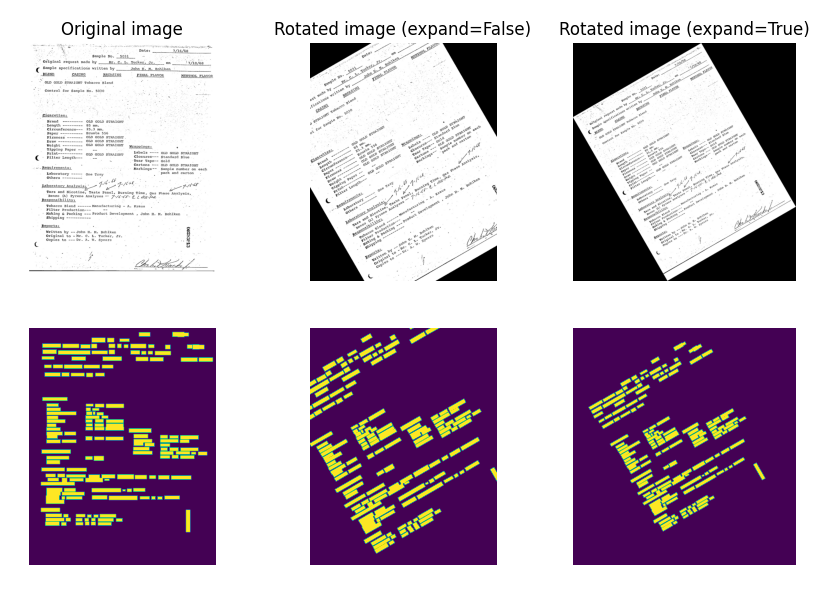
- class RandomRotate(max_angle=5.0, expand=False)[source]#
Randomly rotate a tensor image and its boxes