

Layout analysis & tables#
Text alone loses the structure of a document. docTR can also tell what each region of a page is (a title, a paragraph, a table, a figure…) and rebuild tables as rows and columns.
Layout analysis#
A layout model detects and classifies the regions of a page. The pretrained lw_detr_s model recognizes
11 classes:
Title Section-header Text List-item Caption Footnote Formula Table Picture Page-header Page-footer
In the OCR pipeline#
Pass detect_layout=True and the regions are attached to every page as
LayoutElement objects:
from doctr.io import DocumentFile
from doctr.models import ocr_predictor

predictor = ocr_predictor(pretrained=True, detect_layout=True)
result = predictor(DocumentFile.from_pdf("invoice.pdf"))

for region in result.pages[0].layout:
    print(f"{region.type:<15} {region.confidence:.2f}")
Page-footer     0.89
Section-header  0.75
Section-header  0.67
Table           0.95
Text            0.78
...
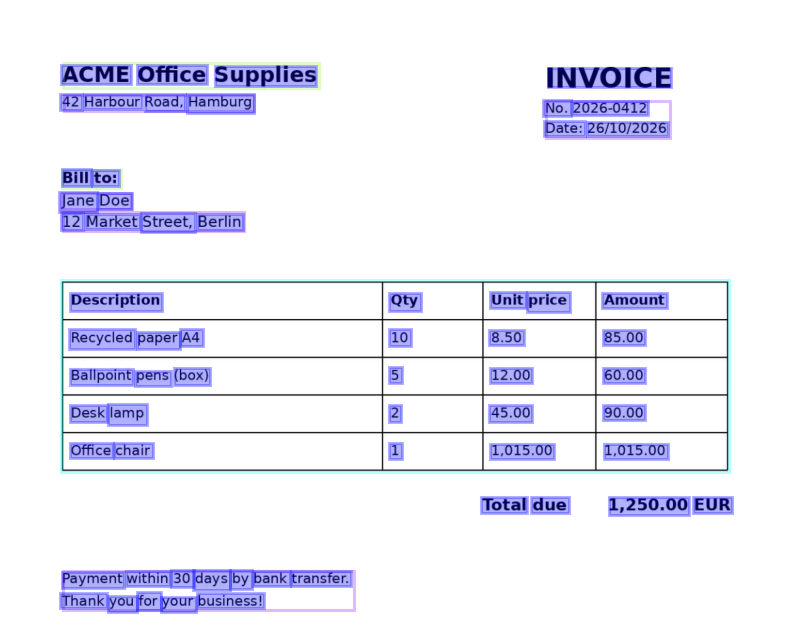
The layout also improves the exports: headings, lists, tables, figures, headers and footers are rendered with the
right structure and in the right place (see Exporting results). It is part of the JSON export under the layout
key, and page.show() draws it.
The layout model shares the input settings of the predictor (assume_straight_pages, preserve_aspect_ratio…)
and the batch size of the detection model (det_bs). Use layout_arch to select another architecture, or to pass
your own fine-tuned model.
Ignore some regions#
Pictures, stamps or tables can produce noisy text. ignore_regions masks the regions of the given layout classes
before text detection and recognition, so their content is simply not read:
predictor = ocr_predictor(pretrained=True, detect_layout=True, ignore_regions=["Picture", "Page-footer"])
Important
ignore_regions relies on the layout model: enable it with detect_layout=True (or detect_tables=True),
otherwise the regions cannot be located and nothing is masked. The CLI enables it automatically.
Table structure recognition#
With detect_tables=True, each region the layout model labels as a Table is cropped and passed to a table
structure model (tablecenternet), which predicts its cells and the rows and columns they span. The words falling
inside a cell are regrouped into a Table:
from doctr.io import DocumentFile
from doctr.models import ocr_predictor

predictor = ocr_predictor(pretrained=True, detect_tables=True)
result = predictor(DocumentFile.from_pdf("invoice.pdf"))

table = result.pages[0].tables[0]
print(table.num_rows, table.num_cols)  # 5 4
print(table.render())
Description	Qty	Unit price	Amount
Recycled paper A4	10	8.50	85.00
Ballpoint pens (box)	5	12.00	60.00
Desk lamp	2	45.00	90.00
Office chair	1	1,015.00	1,015.00
Important
The words of a table are removed from the regular blocks of the page, so the same text is not returned
twice. Read them through page.tables, or use an export: tables are rendered in place by render(), Markdown,
AsciiDoc and HTML, and stored under the tables key of the JSON export.
Load a table into pandas#
to_grid() returns a dense num_rows × num_cols grid of strings. A cell spanning several
rows or columns has its value at its top-left position:
import pandas as pd

grid = table.to_grid()
df = pd.DataFrame(grid[1:], columns=grid[0])  # first row as header
print(df)
            Description Qty Unit price    Amount
0     Recycled paper A4  10       8.50     85.00
1  Ballpoint pens (box)   5      12.00     60.00
2             Desk lamp   2      45.00     90.00
3          Office chair   1   1,015.00  1,015.00
Cells, spans and geometry#
For full control, iterate over the TableCell objects:
for cell in table.cells:
    print(cell.value, (cell.row_start, cell.row_end), (cell.col_start, cell.col_end), cell.geometry)
Attribute |
Description |
|---|---|
|
The text of the words assigned to the cell |
|
First and last row spanned by the cell (0-indexed, inclusive) |
|
First and last column spanned by the cell (0-indexed, inclusive) |
|
Number of rows / columns spanned |
|
Position of the cell, relative to the page |
|
Mean recognition confidence of the words of the cell |
|
Score of the cell predicted by the table model |
Standalone predictors#
Both models can also run on their own, without text recognition:
from doctr.models import layout_predictor

predictor = layout_predictor("lw_detr_s", pretrained=True)
out = predictor(pages)

# One dict per page
out[0]["class_names"]  # ['Page-footer', 'Section-header', ..., 'Table', 'Text', ...]
out[0]["boxes"]  # (N, 4) array of relative (xmin, ymin, xmax, ymax)
out[0]["scores"]  # N confidence scores
Pass images of tables, e.g. crops of the Table regions:
from doctr.models import table_predictor

predictor = table_predictor("tablecenternet", pretrained=True)
out = predictor([table_image])

out[0]["num_rows"], out[0]["num_cols"]  # (5, 4)
out[0]["cells"][0]
# {'geometry': [[x1, y1], ..., [x4, y4]],  # relative to the table image
#  'score': 0.42, 'row_start': 0, 'row_end': 0, 'col_start': 0, 'col_end': 0}
See Task-specific predictors for all the task-specific predictors.