doctr.transforms
Data transformations are part of both training and inference procedure. Drawing inspiration from the design of torchvision, we express transformations as composable modules.
Supported transformations
Here are all transformations that are available through docTR:
- class doctr.transforms.modules.Resize(size: int | tuple[int, int], interpolation=InterpolationMode.BILINEAR, preserve_aspect_ratio: bool = False, symmetric_pad: bool = False, return_padding_mask: bool = False)[source]
Resize the input image to the given size
>>> import torch
>>> from doctr.transforms import Resize
>>> from doctr.utils import Sample
>>> transfo = Resize((64, 64), preserve_aspect_ratio=True, symmetric_pad=True)
>>> out = transfo(Sample(image=torch.rand((3, 64, 64))))
- Parameters:
size – output size in pixels, either a tuple (height, width) or a single integer for square images
interpolation – interpolation mode to use for resizing, default is bilinear
preserve_aspect_ratio – whether to preserve the aspect ratio of the image, if True, the image will be resized to fit within the target size while maintaining its aspect ratio
symmetric_pad – whether to symmetrically pad the image to the target size, if True, the image will be padded equally on both sides to fit the target size
return_padding_mask – whether to return a boolean mask alongside the image, with True on valid (image content) pixels and False on padded areas. This matches how masks propagate through the other transforms (padding and rotation fill new areas with False).
- class doctr.transforms.modules.GaussianNoise(mean: float = 0.0, std: float = 1.0)[source]
Adds Gaussian Noise to the input tensor
>>> import torch
>>> from doctr.transforms import GaussianNoise
>>> from doctr.utils import Sample
>>> transfo = GaussianNoise(0., 1.)
>>> out = transfo(Sample(image=torch.rand((3, 224, 224))))
- Parameters:
mean – mean of the gaussian distribution
std – std of the gaussian distribution
- class doctr.transforms.modules.ChannelShuffle[source]
Randomly shuffle channel order of a given image
>>> import torch
>>> from doctr.transforms import ChannelShuffle
>>> from doctr.utils import Sample
>>> transfo = ChannelShuffle()
>>> out = transfo(Sample(image=torch.rand((3, 224, 224))))
- class doctr.transforms.modules.RandomHorizontalFlip(p=0.5)[source]
Randomly flip the input image horizontally
>>> import torch
>>> from doctr.transforms import RandomHorizontalFlip
>>> from doctr.utils import Sample
>>> transfo = RandomHorizontalFlip(p=1.0)
>>> out = transfo(Sample(image=torch.rand((3, 224, 224)), target=np.array([[0.1, 0.2, 0.3, 0.4]])))
- class doctr.transforms.modules.RandomShadow(opacity_range: tuple[float, float] | None = None)[source]
Adds random shade to the input image
>>> import torch
>>> from doctr.transforms import RandomShadow
>>> from doctr.utils import Sample
>>> transfo = RandomShadow((0., 1.))
>>> out = transfo(Sample(image=torch.rand((3, 64, 64))))
- Parameters:
opacity_range – minimum and maximum opacity of the shade
- class doctr.transforms.modules.RandomGlare(opacity_range: tuple[float, float] | None = None, num_spots: tuple[int, int] = (1, 3))[source]
Adds soft bright reflections to the image, like a light source mirrored on a photographed screen or a glossy sheet
>>> import torch
>>> from doctr.transforms import RandomGlare
>>> from doctr.utils import Sample
>>> transfo = RandomGlare((0.2, 0.7))
>>> out = transfo(Sample(image=torch.rand((3, 64, 64))))
- Parameters:
opacity_range – minimum and maximum strength of the reflections
num_spots – minimum and maximum number of reflections
- class doctr.transforms.modules.RandomLighting(strength_range: tuple[float, float] | None = None)[source]
Multiplies the image by a smooth low-frequency brightness field: uneven lighting, the shading of a crumpled or curved sheet, vignetting
>>> import torch
>>> from doctr.transforms import RandomLighting
>>> from doctr.utils import Sample
>>> transfo = RandomLighting((0.1, 0.4))
>>> out = transfo(Sample(image=torch.rand((3, 64, 64))))
- Parameters:
strength_range – minimum and maximum amplitude of the field (0.3 = brightness between 0.7 and 1.3)
- class doctr.transforms.modules.RandomPerspective(distortion: float = 0.2)[source]
Warps the image and its boxes with a random perspective, as if the page were photographed at an angle
>>> import numpy as np
>>> import torch
>>> from doctr.transforms import RandomPerspective
>>> from doctr.utils import Sample
>>> transfo = RandomPerspective(distortion=0.2)
>>> out = transfo(Sample(image=torch.rand((3, 64, 64)), target=np.array([[0.1, 0.1, 0.5, 0.5]])))
- Parameters:
distortion – maximum relative displacement of every image corner (0.2 = up to 20% of the width / height)
- class doctr.transforms.modules.RandomResize(scale_range: tuple[float, float] = (0.3, 0.9), preserve_aspect_ratio: bool | float = False, symmetric_pad: bool | float = False, p: float = 0.5)[source]
Randomly resize the input image and align corresponding targets
>>> import torch
>>> from doctr.transforms import RandomResize
>>> from doctr.utils import Sample
>>> transfo = RandomResize((0.3, 0.9), preserve_aspect_ratio=True, symmetric_pad=True, p=0.5)
>>> out = transfo(Sample(image=torch.rand((3, 64, 64))))
- Parameters:
scale_range – range of the resizing factor for width and height (independently)
preserve_aspect_ratio – whether to preserve the aspect ratio of the image,
value (given a float)
probability (the symmetric padding will be applied with this)
symmetric_pad – whether to symmetrically pad the image,
value
probability
p – probability to apply the transformation
Composing transformations
It is common to require several transformations to be performed consecutively.
- class doctr.transforms.modules.SampleCompose(transforms: list[Callable[[Sample], Sample]])[source]
Implements a wrapper that will apply transformations sequentially on both image and target
>>> import numpy as np
>>> import torch
>>> from doctr.transforms import SampleCompose, ImageTransform, ColorInversion, RandomRotate
>>> from doctr.utils import Sample
>>> transfos = SampleCompose([ImageTransform(ColorInversion((32, 32))), RandomRotate(30)])
>>> out, out_boxes = transfos(Sample(image=torch.rand(8, 64, 64, 3), target=np.zeros((2, 4))))
- Parameters:
transforms – list of transformation modules
- class doctr.transforms.modules.ImageTransform(transform: Callable[[Any], Any])[source]
Implements a transform wrapper to turn an image-only transformation into an image+target transform
>>> import torch
>>> from doctr.transforms import ImageTransform, ColorInversion
>>> from doctr.utils import Sample
>>> transfo = ImageTransform(ColorInversion((32, 32)))
>>> out = transfo(Sample(image=torch.rand(8, 64, 64, 3)))
- Parameters:
transform – the image transformation module to wrap
- class doctr.transforms.modules.ColorInversion(min_val: float = 0.5)[source]
Applies the following tranformation to a tensor (image or batch of images): convert to grayscale, colorize (shift 0-values randomly), and then invert colors
>>> import torch
>>> from doctr.transforms import ColorInversion
>>> from doctr.utils import Sample
>>> transfo = ColorInversion(min_val=0.6)
>>> out = transfo(Sample(image=torch.rand(8, 64, 64, 3)))
- Parameters:
min_val – range [min_val, 1] to colorize RGB pixels
- class doctr.transforms.modules.OneOf(transforms: list[Callable[[Sample], Sample]])[source]
Randomly apply one of the input transformations
>>> import torch
>>> from doctr.transforms import OneOf, JpegQuality, Gamma
>>> from doctr.utils import Sample
>>> transfo = OneOf([JpegQuality(), Gamma()])
>>> out = transfo(Sample(image=torch.rand(1, 64, 64, 3)))
- Parameters:
transforms – list of transformations, one only will be picked
- class doctr.transforms.modules.RandomApply(transform: Callable[[Sample], Sample], p: float = 0.5)[source]
Apply with a probability p the input transformation
>>> import torch
>>> from doctr.transforms import RandomApply, Gamma
>>> from doctr.utils import Sample
>>> transfo = RandomApply(Gamma(), p=.5)
>>> out = transfo(Sample(image=torch.rand(1, 64, 64, 3), target=np.array([[0.1, 0.1, 0.9, 0.9]]), mask=None))
- Parameters:
transform – transformation to apply
p – probability to apply
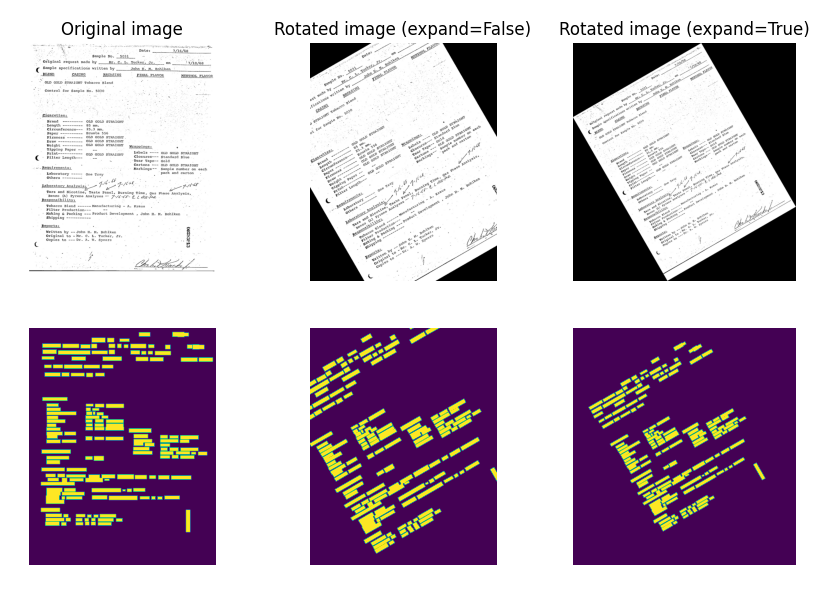
- class doctr.transforms.modules.RandomRotate(max_angle: float = 5.0, expand: bool = False)[source]
Randomly rotate a tensor image and its boxes
>>> import torch
>>> from doctr.transforms import RandomRotate
>>> transfo = RandomRotate(max_angle=30, expand=True)
>>> out = transfo(Sample(image=torch.rand(1, 64, 64, 3), target=np.array([[0.1, 0.1, 0.9, 0.9]]), mask=None))
- Parameters:
max_angle – maximum angle for rotation, in degrees. Angles will be uniformly picked in [-max_angle, max_angle]
expand – whether the image should be padded before the rotation
- class doctr.transforms.modules.RandomCrop(scale: tuple[float, float] = (0.08, 1.0), ratio: tuple[float, float] = (0.75, 1.33))[source]
Randomly crop a tensor image and its boxes
>>> import torch
>>> from doctr.transforms import RandomCrop
>>> from doctr.utils import Sample
>>> transfo = RandomCrop(scale=(0.5, 1.0), ratio=(0.75, 1.33))
>>> out = transfo(Sample(image=torch.rand(1, 64, 64, 3), target=np.array([[0.1, 0.1, 0.9, 0.9]]), mask=None))
- Parameters:
scale – tuple of floats, relative (min_area, max_area) of the crop
ratio – tuple of float, relative (min_ratio, max_ratio) where ratio = h/w